✦ AI-assisted operating system for service businesses

From first inquiry to final payment — one connected workflow for your service business.

Capture inquiries, organize leads, prepare estimates, schedule work, invoice customers, record payments, and follow up — without rebuilding the same customer context across disconnected tools.

SchedMate is a scheduling and business management platform for service businesses. It brings bookings, clients, services, team access, estimates, jobs, invoices, payments, reports, automation, and AI-assisted decisions into one workspace.

  • No credit card
  • No automatic charge
  • No sales call required

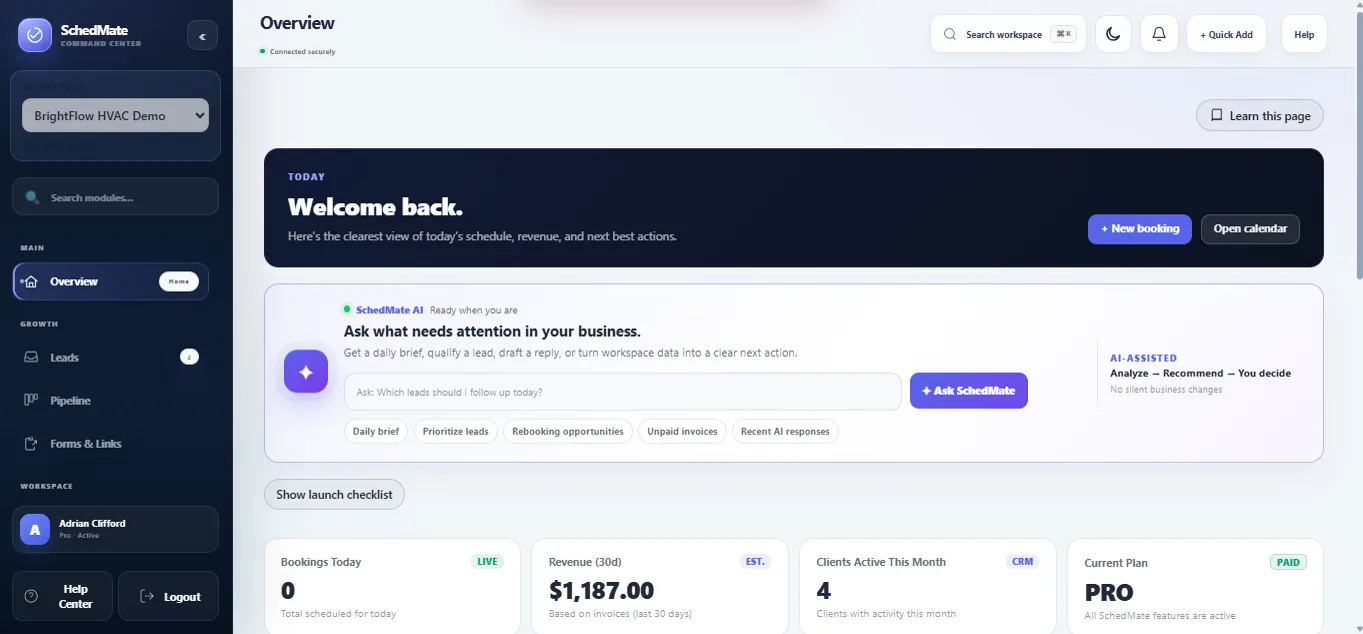
SchedMate · Overview

SchedMate Overview showing bookings, revenue, clients, and business priorities

✦ SchedMate AI

Analyze → Recommend → You decide

Invoice #1042

Payment recorded · balance 0.00

  • Seven-day trialFull core workspace
  • SchedMate AIBriefs, drafts & insights
  • Public booking pageAccept requests anytime
  • Inquiry → paymentOne connected record

The connected workflow

Nine stages. One connected customer journey.

Each stage stays connected to the same customer and work history, so your team can see what happened before and what needs to happen next. Pick a stage to see how the workflow fits together.

Step 01 · Inquiry

A request arrives, with its source attached.

Website forms, Forms & Links, a QR code, a referral, or the public Front Desk when a visitor volunteers their details. The submission enters SchedMate instead of a spreadsheet.

  • Shareable intake link for your site, social profiles, or email signature
  • You choose which fields you need and your follow-up deadline
  • Source tracking travels with the record from the first touch

One loop, connected: inquiry → lead → AI insight → your decision → estimate → booking/job → invoice → payment → follow-up → reports.

✦ SchedMate AI

Your workspace should not just store data. It should help you decide what to do next.

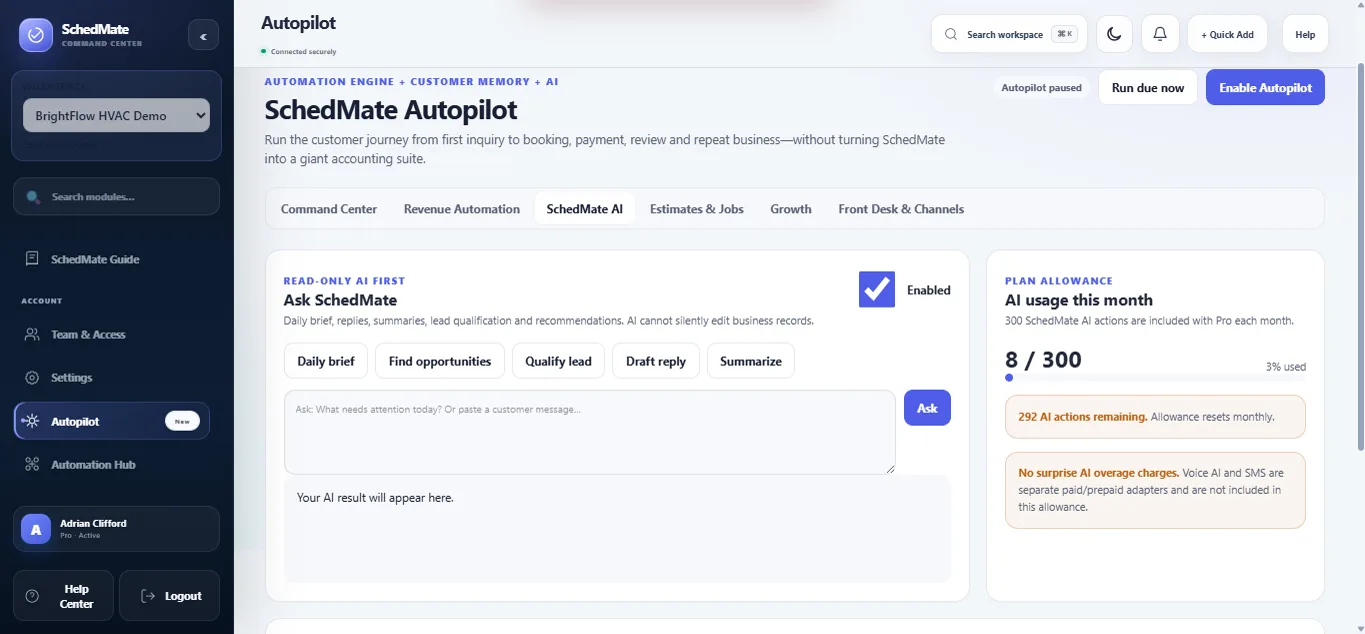
SchedMate AI reads the business context already inside your workspace and turns it into briefs, lead qualification, draft replies, summaries, and opportunities — without changing customer records.

1 · New inquiry

“Hi, how much is AC cleaning? We have 6 units in our office and need service next week.”

Lead source Manual / SchedMate form / Front Desk

2 · Qualify Lead

High-intent lead

  • Specific quantity: 6 units
  • Business customer
  • Clear timeline: next week

Recommended next action Confirm service location + prepare estimate

3 · Draft Reply

“We may have availability Saturday. Send your location and preferred time so we can confirm the right service and price.”

Qualify Lead

Identify intent signals in the inquiry you already have and suggest a sensible next step.

Draft Reply

Turn a customer message into a professional draft. Review, edit, and send it yourself.

Summarize Customer

Condense a long history into completed work, balances, recent activity, and rebooking context.

Daily Brief

Ask what needs attention today across leads, bookings, open estimates, and unpaid invoices.

Find Opportunities

Surface warm leads, stale estimates, unpaid invoices, and customers who may be ready to book again.

?

Ask SchedMate

Ask a focused question about your workspace context and get a concise, read-only answer.

See the real workspace

Watch the workflow instead of imagining it.

An English walkthrough using a sample HVAC company: leads and AI-assisted decisions through scheduling, estimates, jobs, invoices, payments, and automation.

  • Real interface. Actual SchedMate screens, not a concept mockup.
  • Owner-controlled AI. AI recommends; you approve when an AI action is used.
  • Connected records. The same customer journey carries across modules.

What you are looking at

Follow one customer through the workspace.

These are real dashboard screens. The notes explain what each area does before you ever create an account.

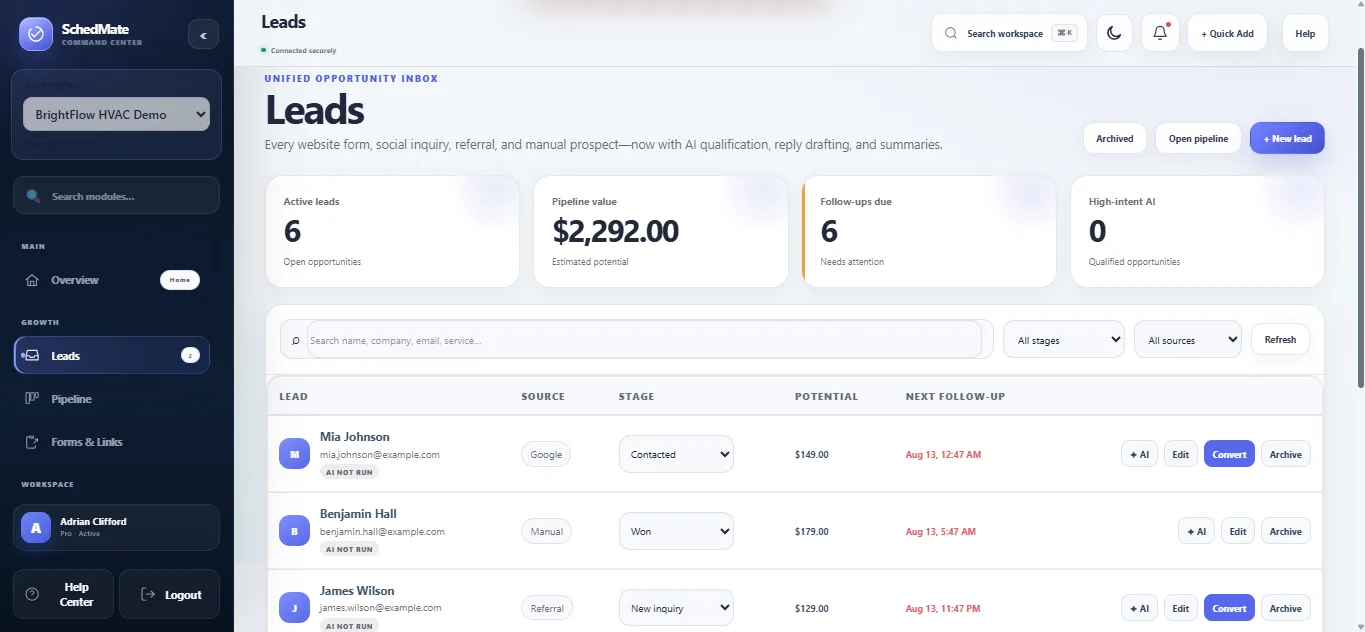
Leads tells you who needs attention.

Website forms, referrals, and manually added prospects live in one opportunity inbox.

  1. Business signals Active leads, pipeline value, follow-ups due, and AI-qualified opportunities.
  2. Sales stage Move a lead from new inquiry through contacted, qualified, proposal, won, or lost.
  3. Next action Edit, convert, archive, or ask AI for qualification, a draft reply, or a summary.
SchedMate Leads Inbox with lead stages, values, follow-up dates, and AI actions

The whole client journey

Everything you need. Nothing you do not.

Connected tools carry a job from first inquiry through to payment, with AI available when you want help deciding the next move.

Bookings & calendar

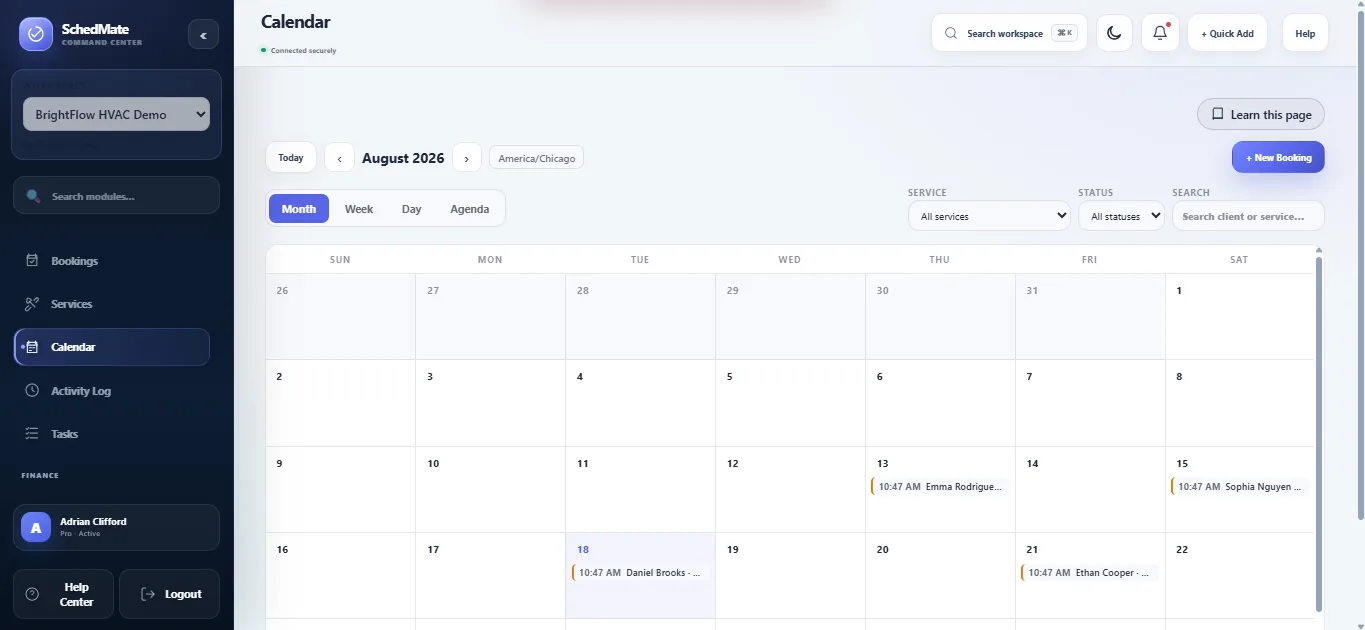
Services, availability, buffers, statuses, and a timeline that shows what actually happened.

Clients & leads

Contact details, notes, history, bookings, and invoices on one profile you can trust.

$

Invoices & payments

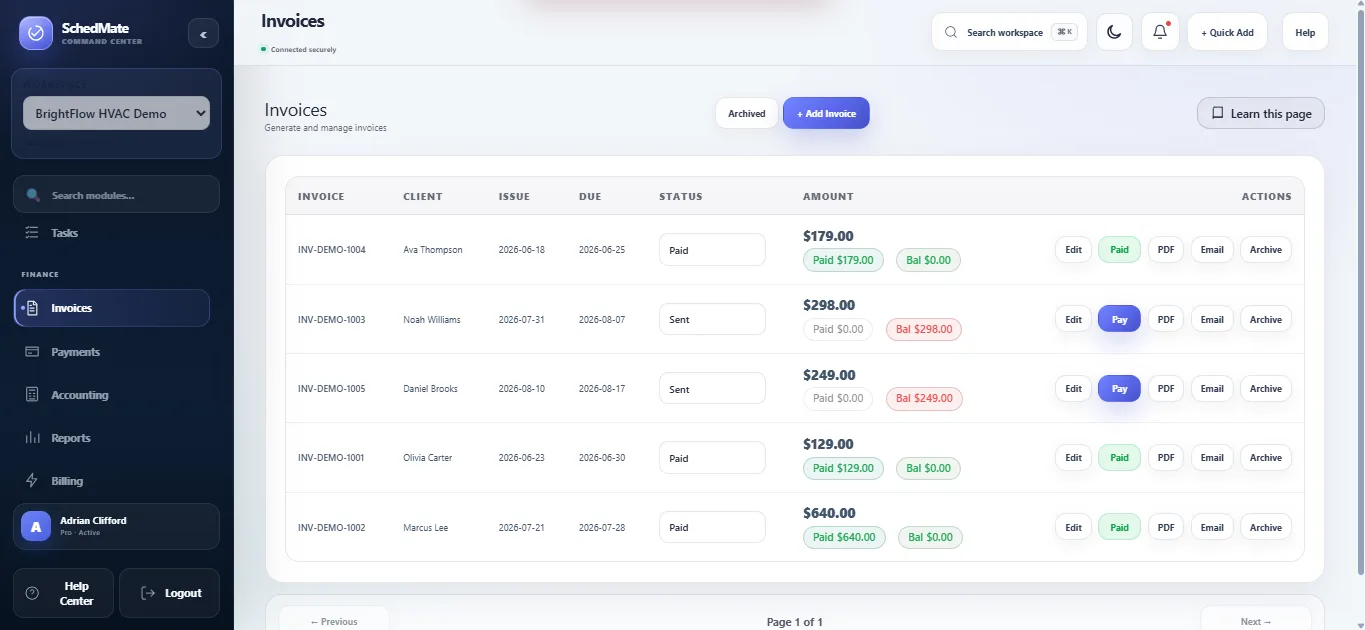
Share a public invoice link, record payments and refunds, and watch the outstanding balance move.

Reports & accounting

Revenue, bookings, outstanding invoices, and expenses — read from your records, not estimated.

Public booking page

Share one link so clients can request a service, on any device, whenever they think of it.

Automation Hub

Public forms, email notifications, and outgoing webhooks for n8n, Make, Zapier, Slack, or your own server.

SchedMate AI & Autopilot

Briefs, lead qualification, draft replies, customer summaries, and opportunity scans — plus enabled Autopilot rules for repeatable follow-up work. See how SchedMate AI works →

Website & social inquiry capture

Give every interested customer a clear path into your workflow.

Use a SchedMate-hosted inquiry link or a website form so customer details arrive as organized leads instead of getting lost across inboxes and notes.

Share a SchedMate link

Put the public inquiry link in a Facebook post, Messenger auto-reply, Instagram bio, email, QR code, or any channel where you can share a URL.

Connect your website

Use Forms & Links to collect structured inquiry details from your website and route accepted submissions into SchedMate Leads.

Keep source context

Track where an inquiry came from, then qualify it, follow up, prepare an estimate, and continue the workflow inside SchedMate.

How Facebook and Messenger work: share the SchedMate inquiry link in your post, bio, or auto-reply. Regular chat messages are not automatically imported; the customer submits the form, then the accepted inquiry appears in Leads.

Team & access

Bring your team in without handing over the keys.

Invite the people who work with you and give each of them exactly the access their job needs. Four preset roles, no permission spreadsheet to maintain.

  • Assign work to a person. Bookings and tasks can be handed to a specific member of the team.
  • Providers see their own day. A service provider opens the workspace to the jobs assigned to them.
  • Money stays with the owner. Billing and workspace ownership are never delegated by an invitation.
  • Invitations expire. Single-use links, redeemable only by the address they were sent to.
  • OwnerFull access, including billing, ownership, and the workspace itself.
  • ManagerRuns the business day to day, including invoices and reports. No billing or ownership.
  • Front DeskBooks and reschedules work, manages clients and leads. No accounting.
  • Service ProviderSees and updates only the work assigned to them.

Guided setup

Start with the essentials. Expand the workflow as your business needs it.

  1. 1

    Add your services

    Pricing, duration, availability, and the details your business actually needs.

  2. 2

    Take bookings

    Share your booking page, or add appointments yourself, each one tied to a client.

  3. 3

    Get paid

    Raise an invoice, share the link, and record the payment against the job.

  4. 4

    Ask AI, then automate

    Use SchedMate AI to see what needs attention, then enable the Autopilot rules you approve.

Start my free workspace

Try first. Decide later.

Try the core workspace first. Upgrade only if it fits.

Begin with a seven-day trial: the core workspace is fully unlocked, plus 3 SchedMate AI actions. No credit card, and no automatic charge when it ends.

7-day trial

$0

Core workspace access plus 3 SchedMate AI actions total. No credit card and no automatic charge.

Start the trial

SchedMate Pro The single paid plan

$29.99/month

Billed monthly. Cancel anytime.

  • Leads, clients, and the pipeline
  • Bookings, calendar, and timeline
  • Estimates, jobs, and the customer portal
  • Invoices, payments, and accounting
  • Reports on your own records
  • Public booking page and forms
  • Automation Hub and webhooks
  • Team & Access with four preset roles
  • SchedMate AI — 300 actions every month
Start free for 7 days

No surprise AI overage charges.

Before you start

The questions people ask first.

Still unsure? Talk to us — there is no sales call in the trial.

Do I need a credit card to try SchedMate?

No. The seven-day trial fully unlocks the core workspace without a card and includes 3 SchedMate AI actions. There is no automatic charge when it ends.

What happens when the trial finishes?

Nothing is charged automatically. If you want to keep going, SchedMate Pro is $29.99 per month, billed monthly, and you can cancel at any time.

Is the trial a limited version of the product?

The core workspace is not cut down: bookings, clients, invoices, payments, reports, the public booking page, Automation Hub, and Team & Access are available. SchedMate AI is capped at 3 actions during the free trial so AI provider costs stay controlled.

Will SchedMate AI message customers or change records by itself?

No. The AI assistant is read-only: it analyzes, drafts, and recommends. You review the result and decide what to do. Autopilot is a separate workflow engine that only runs the rules and channels you explicitly enable.

What counts as one AI action?

One accepted AI request — Daily Brief, Qualify Lead, Draft Reply, Summarize Customer, Find Opportunities, or a focused Ask SchedMate request. Normal work such as adding a client, creating a booking, or recording a payment does not consume an AI action.

Can I bring my team in?

Yes. Team & Access has four preset roles — Owner, Manager, Front Desk, and Service Provider — so each person gets the access their job needs. Billing and workspace ownership are never handed over by an invitation.

Can I get my data out again?

Yes. You can export your data, or delete the workspace, whenever you decide.

Does SchedMate connect to the tools I already use?

The Automation Hub sends outgoing webhook events and supports public forms and email notifications, so you can connect n8n, Make, Zapier, Slack, a CRM, or your own server.

What does Google Sign-In access?

Google Sign-In is optional. If you use it, SchedMate receives your email address and basic profile information to authenticate you. It does not request access to Gmail or Google Calendar, and SchedMate does not currently offer a Google Calendar integration. Read the Privacy Policy →

Can inquiries from my website or Facebook enter SchedMate?

Yes, through SchedMate Forms & Links. You can share a tracked SchedMate inquiry URL in Facebook or Messenger, or use the supported website form/embed flow. A regular Messenger conversation is not automatically copied into SchedMate unless you use a separately supported integration.

Is SchedMate a replacement for full accounting software?

No. SchedMate provides operational accounting-style visibility for invoices, payments, balances, expenses, and reports connected to your service workflow. Businesses with formal bookkeeping, tax, payroll, or statutory accounting needs should continue using the appropriate accounting process or professional tools alongside SchedMate.

Ready for a calmer way to run the business?

Bring your leads, bookings, clients, jobs, invoices, and automations into one workspace — then let SchedMate AI help you see what deserves attention next.

  • No credit card
  • No automatic charge